13 Google Ad Grant Rules and Policies You Need To Know (Updated 2026)
It’s exciting to get approved for the Google Ad Grant but that excitement can quickly turn to stress once you start getting into the rules and policies.
Not only do you have to learn Google Ads, but Google Ad Grant accounts have to comply with rules that go well beyond the standard Google Ad account rules. However, these rules aren’t intended to stress out nonprofits! Instead, they’re intended to give you better results in your Grant account and for the most part, they achieve that.
However, Google’s official documentation around these rules and policies can be unclear, confusing, or even inaccurate in some cases. In this article, we’ll dive deep into the various rules and policies, explaining their purpose, implications, and strategies to stay compliant while maximizing the effectiveness of your Google Ad Grant.
Let’s get started!
Why Do The Rules Exist?
Free money always comes with rules and just as you’d expect with any grant, there are expectations on how that free money is used.
When it comes to the Google Ad Grant, new policies were first added at the start of 2018 and they’ve been continually updated ever since. These rules typically help nonprofits maximize their ad grant by making best practices required (and not “optional” like they are in paid accounts).
But this goes beyond just seeing nonprofits win. Google also wants to make sure that the grant is used in a way that keeps searchers happy and keeps users coming back to Google.
Google needs their search results to show the best possible answer to the person searching, that’s what keeps people coming back, clicking ads, and generating revenue. If a nonprofit uses the ad grant to try and show irrelevant results, that’s bad for the nonprofit and bad for Google search. As a result, Ad Grant accounts have rules around the types of keywords that can be used, the relevance of those keywords, requirements on click-through rate and so on.
Across almost all these rules you see the theme of relevance coming up again and again so keep the idea of relevance in mind as you review the rules and policies.
Do Ad Grant Rules Limit Effectiveness?
Google Ad Grant rules rarely, if ever, limit the effectiveness of your account. Instead, the real limiting factor is that Google Ad Grant accounts only show ads in positions below paid ads and there are two separate auctions that occur, one for grants and one for paid accounts.
If you’re targeting keywords that have a lot of competition from paid accounts, like “donate my vehicle”, you’re going to have a very hard time getting results in an ad grant account.
Beyond that, the Google Ad Grant rules can make these accounts more difficult to manage (at least at first) but the actual effectiveness of your search ads aren’t limited by the rules.
Google Ad Grant Rules
With the background out of the way, let’s start taking a look at each rule, what it means, why it exists, and what you really need to know about it.
Rule 1: No Single Word Keywords
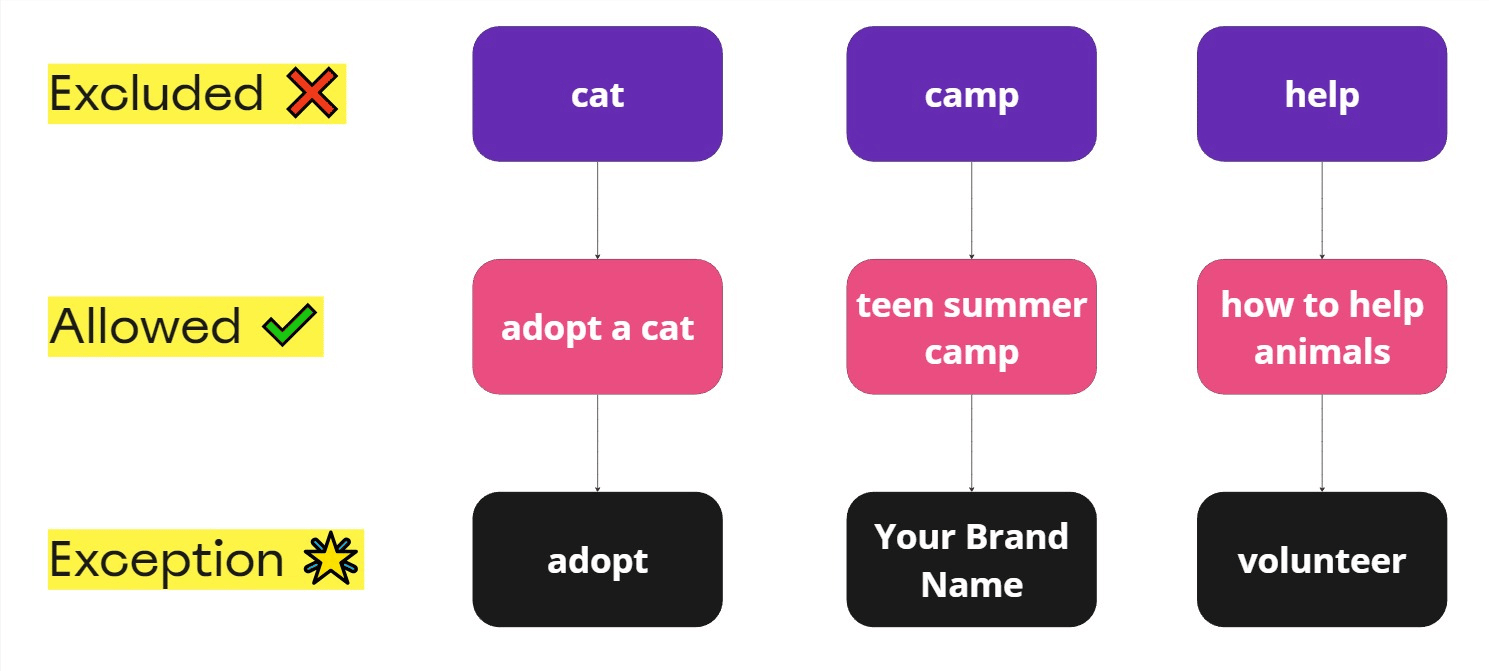
Remember that Google values relevance for search ads and you’re unlikely to be consistently relevant for single word keywords like “cat”, “healthcare”, “camp”, etc.
Instead, you’ll need to add more to your keywords like “foster a cat”, “healthcare for sickle cell”, “mental health camp” and so on. All of these variations will help increase your relevance and make sure you’re finding the right people.
There are exceptions to this rule and Google has a list of single word keywords that are allowed which you can see here. You’re also allowed to use your brand name as a keyword if it happens to be a single word.
It’s rare, in a grant account or a paid account, that a single keyword phrase is mission critical so for the most part this rule shouldn’t slow you down too much.
Rule 2: No Overly Generic Keywords
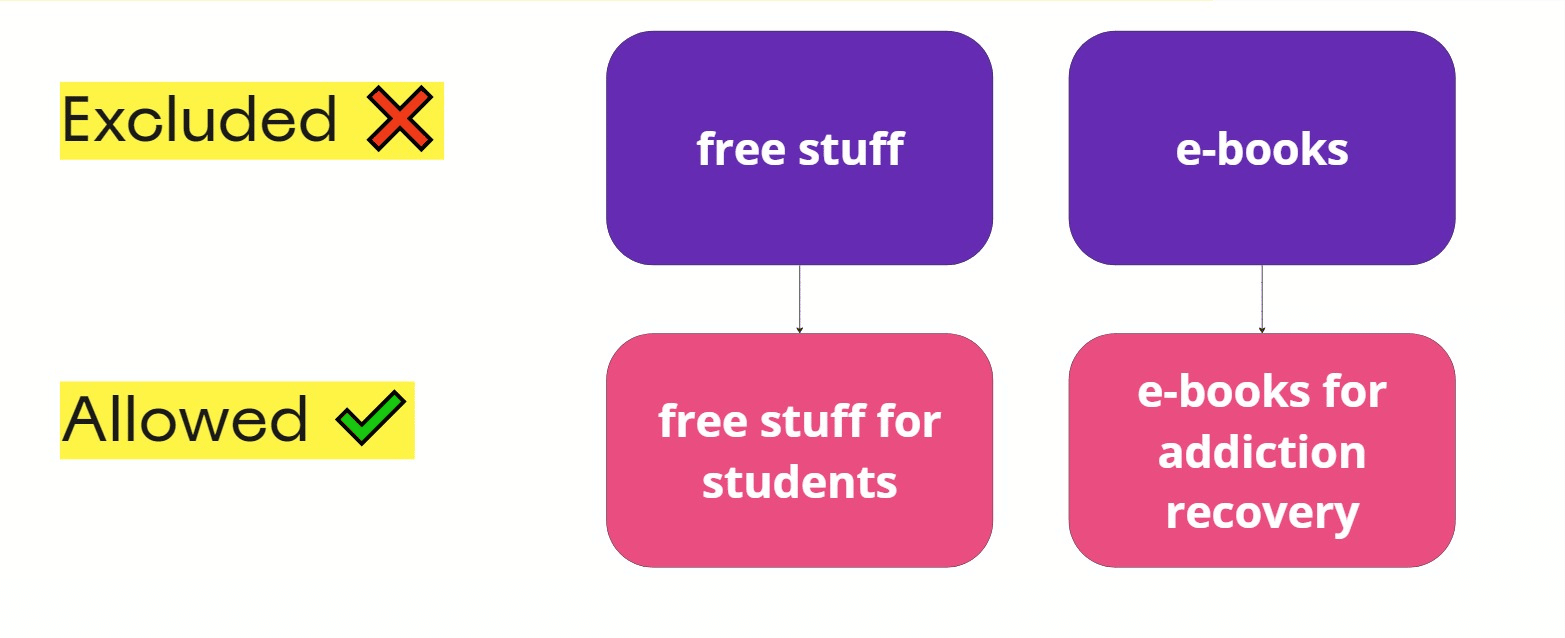
Similar to the first rule, Google doesn’t want Ad Grant accounts to target overly broad (or generic) keywords. Keywords like “today’s news” or “free stuff” comply with rule 1 but are too broad and unlikely to be relevant enough to match the search intent of the person searching. After all, how much do we know about the intent of someone searching for “free stuff”, what stuff are we talking about?
Instead, narrow down your keywords further to more closely match the intent of the search, like “free stuff for cat parents” or “free stuff for older adults”. Of course, there’s some room for interpretation so use your best judgement and let your click-through rate and conversions tell you what’s a good intent match and what isn’t.
Google does give a tip to check your landing page score and if you see a “below average” score then your keyword targeting could be too generic. I’ve found this to be helpful but far from gospel and a low landing page score could simply be an issue with the landing page and not the keywords you’re targeting.
Don’t overthink this too much and remember to stay relevant and specific to your mission when adding keywords and you shouldn’t have a big issue here.
Rule 3: No Keywords With Quality Score Of 1 or 2
Google uses your Expected click-through rate (CTR), Ad relevance, and Landing page experience to determine your Quality Score which is a 1 to 10 rating of how helpful and relevant your ad and keywords is for search queries you’re trying to target.
Essentially, if your keyword isn’t a good fit for your landing page (the page someone goes to when they click an ad) or doesn’t match the text on your ad then you’re likely to end up with a low quality score.
We’re glossing over a few details here and quality score has many more layers to it but when it comes to getting started with your Google Ad Grant, it really comes down to relevance (again). If you’re targeting keywords that make sense for your landing page, ads, and mission you’re rarely going to have quality score of 1 or 2.
These days, Google will automatically pause keywords with a quality score of 1 to 2 so they’re less an issue of compliance and more an issue with how you’ve structured your campaign.
Rule 4: Must Maintain 5% Click Through Rate Each Month
Click-through rate (CTR) is the percentage of people that click your ad after seeing it. If 100 people see your ad and 5 people click it then your click-through rate is 5%.
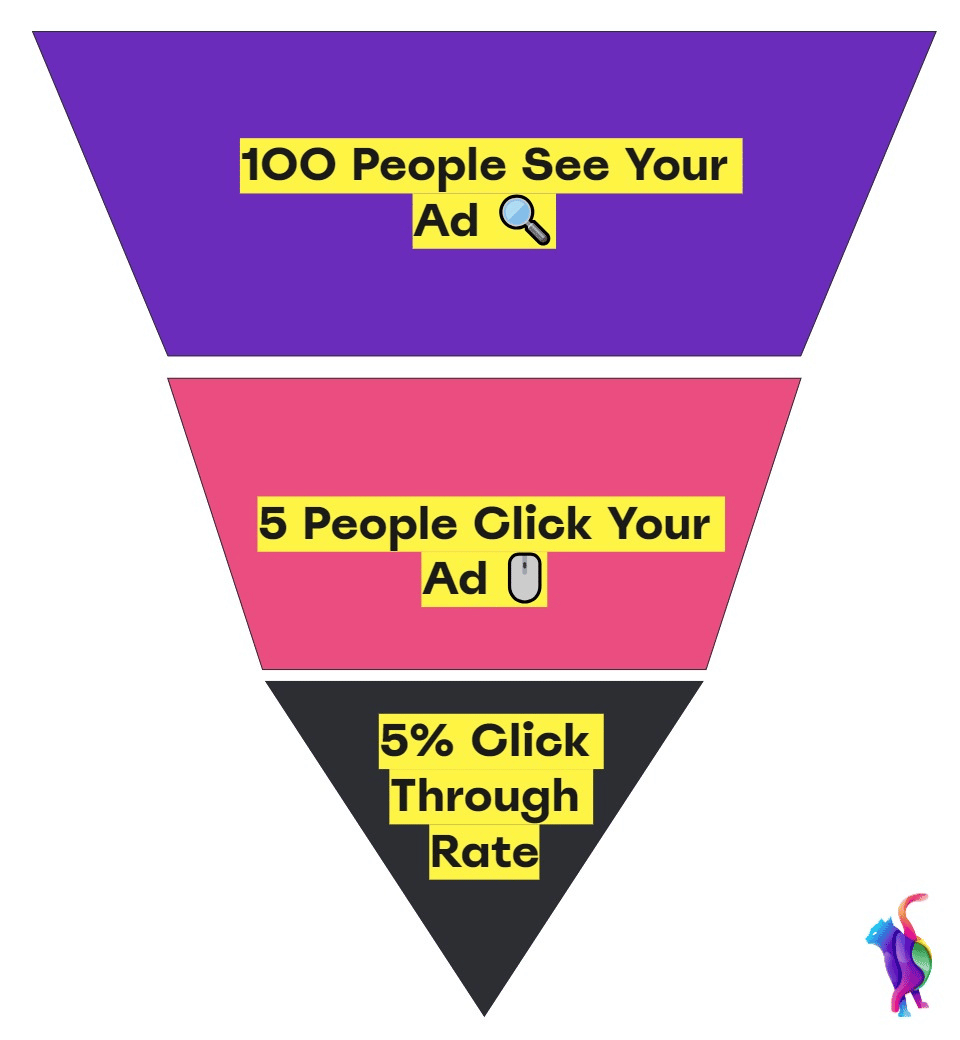
Once again, this rule brings us back to the idea of relevance and maintaining a 5% click-through rate will not be difficult if the text in your ads match up to your keywords. For example, if you’re advertising on the keyword “adopt a cat” but your ad is all about donating a car you can expect a low click-through rate. On the other hand, if your ad tells the searcher you have dozens of cats available for adoption, you’re likely to have a much higher than 5% click-through rate.
If you fail to maintain a 5% CTR for two consecutive months, your account will be suspended. But when starting a new account, you have 90 days to comply and get things in order.
That might sound intimidating, but not only is achieving 5% CTR relatively easy if you’re selecting the right keywords but you can also greatly increase your CTR through strategies like adding a branded campaign (which you can read about here) or simply pausing lower CTR campaigns for a bit to “balance” out the account.
Rule 5: Must Have Conversion Tracking (And 1 Conversion Per Month)
Conversions are actions that you want users to take on your website and could be anything from clicking a particular button, signing up for an email list, completing a donation, and much more.
Google requires that you have conversion tracking in place and that you’re getting at least one per month. In most cases, you’ll want to use Google Analytics 4 to set up your conversions and import them into Google Ads. Not only will this give you more flexibility in the type of conversions you report but it will also allow you to track conversions on other platforms which is critical for your overall nonprofit marketing plan.
But not all conversions are equal and Google wants to see meaningful conversions from your Ad Grant Account which are important actions like contacting your nonprofit, donating, or anything that truly moves your mission forward. Low quality conversions are usually page views or more passive events that happen a high percentage of the time. Google explains that “A good indicator is whether the Conv. Rate is greater than 15%, If so, consider excluding some actions from Conversions.”
If your conversion rate is over 15% for the entire account (not individual campaigns) you will need to adjust your tracking to comply with Ad Grant requirements. Not only does this need to be done to comply with Google Ad Grant rules, if your conversion rate looks like this then you’re not really getting accurate data:
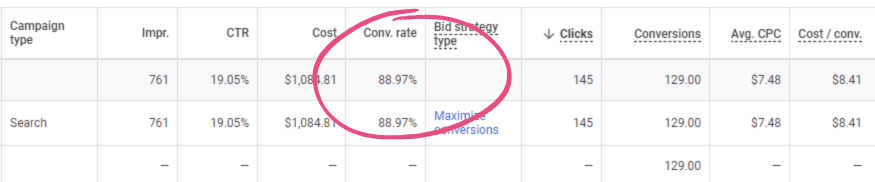
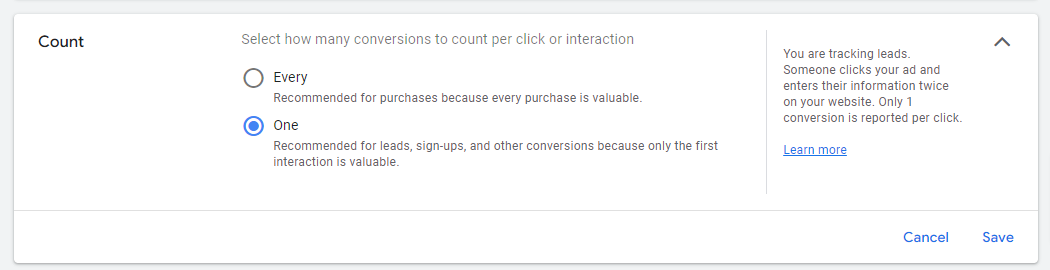
Besides selecting low quality conversions (like pageviews), the other mistake I commonly see is counting conversions every time instead of once. If you’re counting a button click, pageviews, phone calls and similar conversions and you have this set to “Every” one person could generate several conversions despite only the first one really providing value to your nonprofit.
Instead, selecting “One” will usually lead to better reporting unless you’re specifically tracking purchases.
Rule 6: Must Use Conversion Based Bidding
In addition to tracking and generating conversions, Google Ad Grant accounts also need to use conversion based bidding strategies like Maximize conversions, Maximize conversion values, Target CPA, or Target ROAS bidding.
However, unlike some of the other rules here, which can get your account suspended, if you fail to implement this Google will likely (but not always) automatically switch your account over to a conversion based bidding strategy.
Still, I’ve seen many accounts that have used Manual CPC or Maximize Clicks for months or even years without being automatically switched. As a result, these account are usually stagnant since they’re stuck at the $2.00 cost per click maximum. But that $2.00 bid cap is effectively removed when using conversion-based bidding.
Rule 7: Two Ad Groups Per Campaign
This rule could be considered a sort of best practice in most Google Ad accounts (paid or grant). Each ad group should be clustered around a theme with appropriate keywords along with an ad that’s relevant to the keywords.
To better understand this, take a look at this image of Google Ad Account structure:
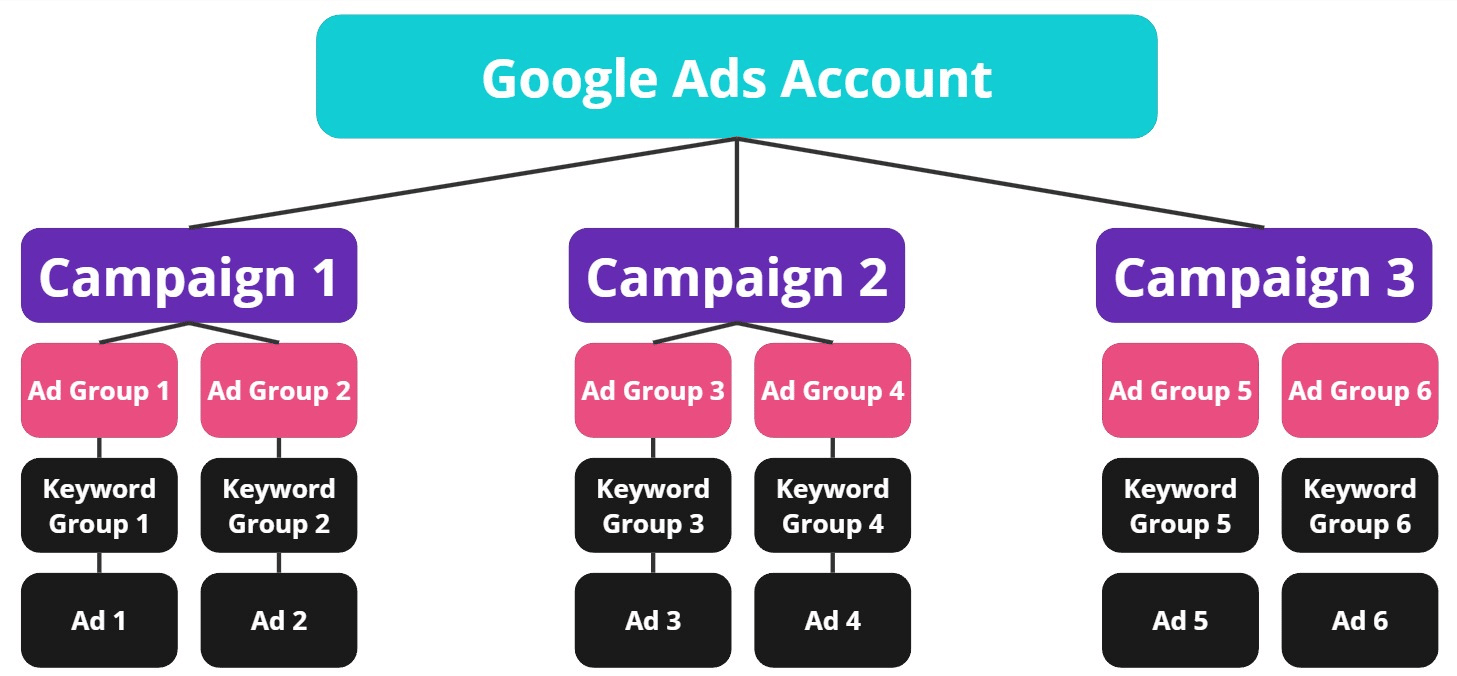
In general, your campaigns should target a specific audience and geographic location with your ad groups segmenting from there.
For example, if you’re running a campaign for an animal shelter you may have a campaign that’s targeting adopters in your area with the following ad groups:
- Adopt A Dog
- Adopt A Puppy
- Adopt A Kitten
- Adopt A Cat
- And so on
The important part is to make sure that every campaign has two ad groups below it.
Rule 8: Two Sitelink Extensions
Sitelink extensions are the extra links that show up under your main headlines and they’re a great way to take up more space in the search results and get more clicks. Here’s what they look like (they’re inside the box):
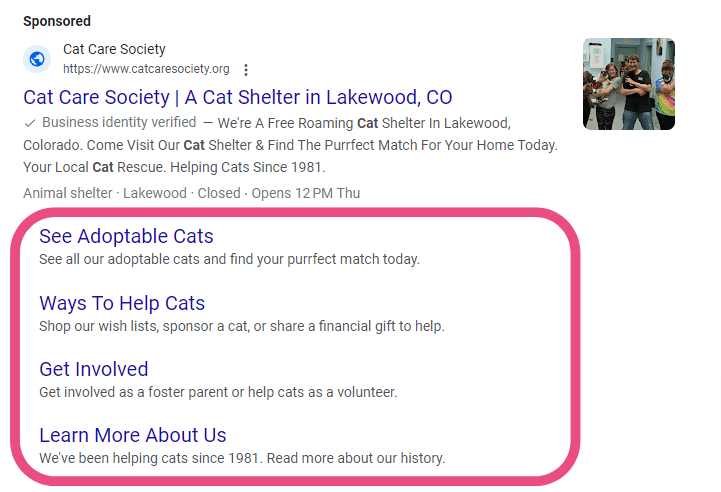
Within the Google Ads platform, they’re now called “Assets” and this is another example where the official Google Ad Grant documentation needs to be updated. But whatever you call them, you’ll absolutely want more than 2 and it’s not uncommon to have a dozen sitelinks in an account.
Best practice is to make your sitelinks relevant to your specific ad. For example, if you have an ad group about adopting a cat, your sitelinks could include pages that support that search like:
- Where We’re Located
- Our Adoption Process
- Meet Our Cats
- Contact Us
- Etc
Sitelinks are just part of several extensions (now called assets) that you can use and it’s recommended that you use as many as make sense in your grant account!
Rule 9: Campaigns Must Use Geotargeting
Google explains that nonprofits must “show ads in locations where users will find your nonprofit’s information and services useful”.
Simply put, you can’t just target the entire world and call it a day. Instead, you need to put some thought into your location targeting and make sure it makes sense for your organization. This is done when you create a campaign and can be adjusted under the location settings at any time:
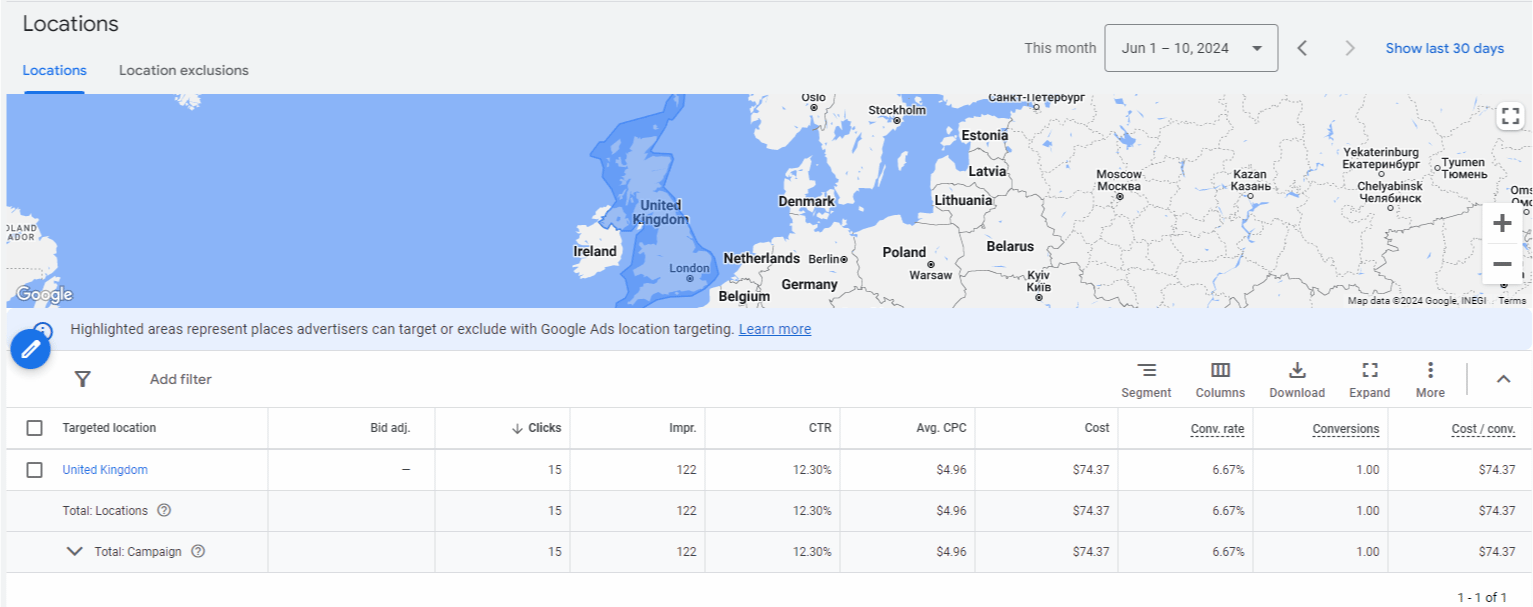
This doesn’t mean you can’t target multiple locations or countries though. Google shares an example of a nonprofit in Nepal that has a donor base in the United States, in that case it makes perfect sense to have ads targeting the United States.
However, just make sure you’re not misleading anyone with your ad copy and if you’re running a summer camp in Scotland but campers often fly from the United States to attend, make sure that your US ads indicate that the camp is actually in Scotland.
Rule 10: Respond To Program Survey
Google’s documentation explains that they’ll send out an annual survey with around 25 questions about Google Ad Grant experience. However, they haven’t actually been emailing it out in recent years. Still, I typically suggest that nonprofits take a few minutes to complete it even if they don’t get an email just in case it got caught up in spam filters, sent to the wrong person, or any other number of things.
The survey is connected to your account ID (ten digits in the corner of your account), so even if you didn’t get the email directly you can still fill it out. You can find the link to the survey here.
Google Ad Grant Policies
The Google Ad Grant program also has a set of website policies that are usually considered when you first apply. However, I have seen nonprofits run into problems by drifting into noncompliance after being approved for the grant so it’s important to be familiar with these as well or make sure you’re working with a Google Ad Grant agency that is.
Policy 1: Only Send Traffic To Your Owned Domain
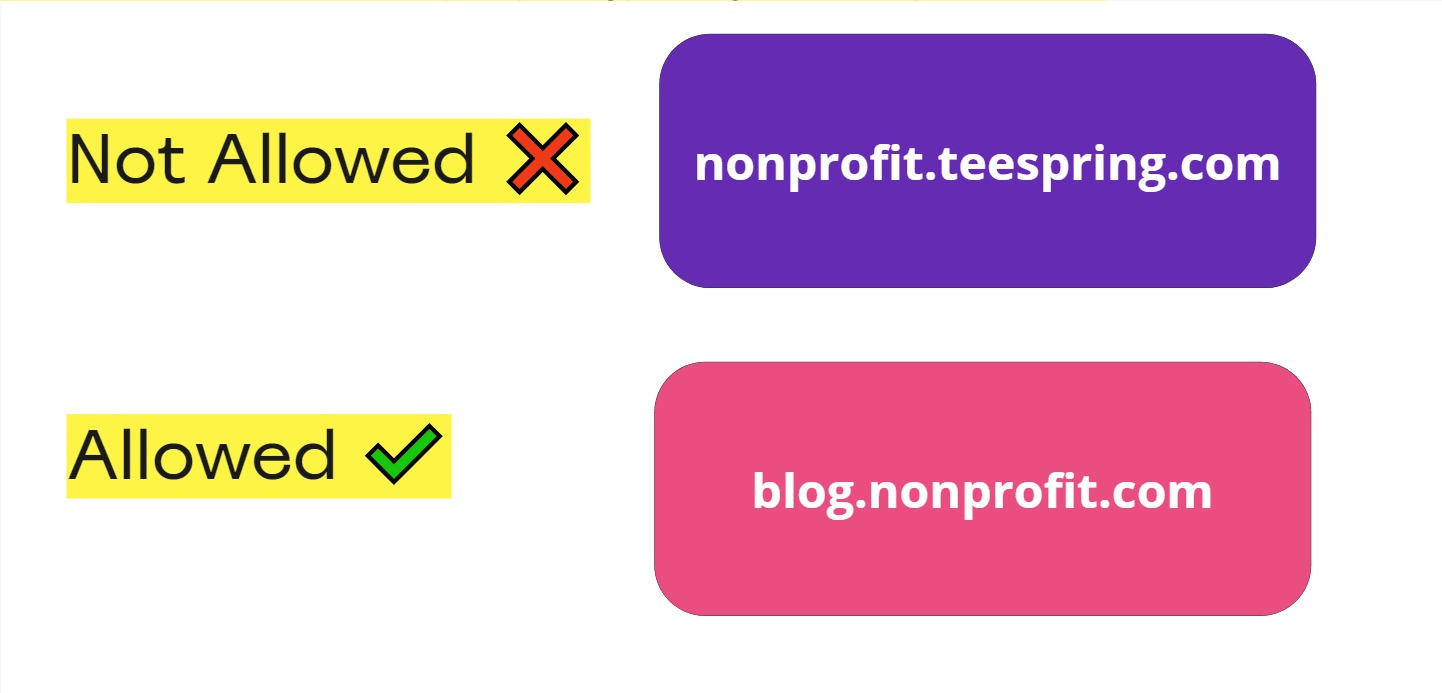
You must own the website that searchers go to when they click your ad. I know, that seems obvious but nonprofits regularly run into problems when it comes to subdomains. It’s common for donation platforms, shops, event signups and other actions to occur on a subdomain like nonprofit.teespring.com or nonprofit.eventscribe.net.
Because they aren’t actually domains owned by you (and instead owned by Teespring and Eventscribe in these examples) you can’t send people to those domains. However, if you own the subdomain (like blog.yournonprofit.com) then you can send traffic to that domain without an issue.
If you’re not sure, check the last part of the domain before the “.com” and if it’s your domain (like blog.yourdomain.com) then you’re good to go. If it’s not, then you won’t be in compliance without specific approval (which you can request here).
Policy 2: Have A High Quality Website
Your website should load quickly and not have broken links or significant technical problems (like very slow page speed). Additionally, your mission should be clear, your content up-to-date across your website and your website should be secured with HTTPS (using SSL certificate).
The issue that usually leads to noncompliance is a lapse in your SSL certificate which will then show your website as “unsecured” in the Chrome browser. This is an easy fix and your hosting provider should be able to help you resolve it.
Policy 3: Limited Commercial Activity and Advertising
Commercial activity can’t be the main purpose of your website and you have to comply with policy before you’re approved for the Google Ad Grant.
However, that doesn’t mean you can’t have any commercial activity and it’s not uncommon to promote shops and services with the Google Ad Grant.
But where I see nonprofits fall out of compliance after approval is with some of the smaller details like “your website may not host affiliate advertising links”. It can be easy enough to toss in an affiliate link and I’ve worked with several nonprofits who have been approached by organizations with incentives to add those affiliate links.
Again, these policies are generally reviewed at the time of grant approval, but you’ll still need to be aware of them as your organization grows and make sure you’re not drifting to noncompliance.
Are There Rules On How Frequently I Log In?
There was a rule at one point that required you to log in every 30 days and make an edit every 90 days but that’s no longer an active rule. You will still see it floating around quite a bit but there’s no active Google documentation supporting it.
It’s also one of those rules that should never be an issue. You should be logging into your Google Ad Grant account more than once every 30 days and typically making edits as well. However, it’s not part of compliance and this catchall rule was replaced by the much more specific rules we’ve already covered.
My Account Isn’t Compliant…But Nothing Has Happened!
That doesn’t mean something won’t happen.
The accounts I’ve seen get suspended usually have multiple issues and they’re relatively extreme. As in, not one generic keyword but dozens with no conversion tracking and missing sitelink extensions.
However, it also seems that Google will routinely “sweep” accounts (which is consistent in how they manage other products) and leave non-compliant accounts alone for weeks or months until they suspend a large portion at once. So just because your account has been performing while still non-compliant doesn’t mean you don’t need to fix the issues!
How To Get Your Account Reactivated
If you’re here because your account has been inactivated for not complying with one of these rules, you can use this form to get your account live again after you fix the issue. To increase your chances of success and make the process easier, try to include an image of the changes as this will usually speed up the process.
Closing Thoughts
The Google Ad Grant is an amazing tool but the rules (and concerns over accidentally breaking them) have kept many nonprofits from ever starting. I hope this article helped clarify these rules and give you the motivation to maximize your Google Ad Grant!
And if you want help or have questions about your grant, feel free to book a call with me here or learn more about our Google Ad Grant management here. Thanks for reading!