Google Ad Grants Application & Eligibility: 2025 Guide for Nonprofits
If your nonprofit has ever applied for a grant before then you know just how tedious, complicated, and confusing the process can be!
Heck, there are whole industries of grant managers, writers and more just to support the process.
But that isn’t the case with the Google Ad Grant which provides $10,000 a month of in-kind Google Ads advertising and can be applied for in less than 20 minutes. This grant is available in more than 60 countries around the world and can have a huge impact on your nonprofit’s mission.
In this article, I’ll explain exactly how to apply for the Google Ad Grant in 3 steps.
First, we’ll make sure that your nonprofit is eligible, then we’ll apply for a Google for nonprofits account, and finally we can apply for the Google Ad Grant.
The entire process will typically take less than 20 minutes of your time but because we have to wait for verification on Google’s side it will typically take 7 to 10 days between starting the process and having access to an active Google Ad Grant account.
Let’s get started!
Step 1: Eligibility Requirements
Before we apply, we need to make sure your nonprofit is eligible for a Google Ad Grant. Below is a video walkthrough of the eligibility criteria, plus links to Google’s official documentation.
You can also refer to Google’s documentation and we’ll be covering everything on the eligibility requirements and website policies pages.
Are You A Registered Nonprofit?
In the United States, that means you’re classified as a 501(c)(3), in the United Kingdom organizations need to be registered with the charity regulator and so on. Organizations that have a proven affiliation to a nonprofit that has 501(c)(3) status are also eligible.
Is Your Nonprofit In An Eligible Country?
The Google Ad Grant program is active in more than 60 countries so there’s a good chance your country is included. You can see the full list of countries here.
Are You In An Excluded Industry?
Not all nonprofits are eligible and Google excludes the following from the program:
- Governmental organizations or entities
- Hospital or health care organization
- A school, academic institution, or university
If you’re not sure, you should still apply as there are many educational and healthcare nonprofits. These rules are primarily intended to exclude governmental organizations and nonprofits that effectively function as a business.
Do You Fully Own Your Domain?
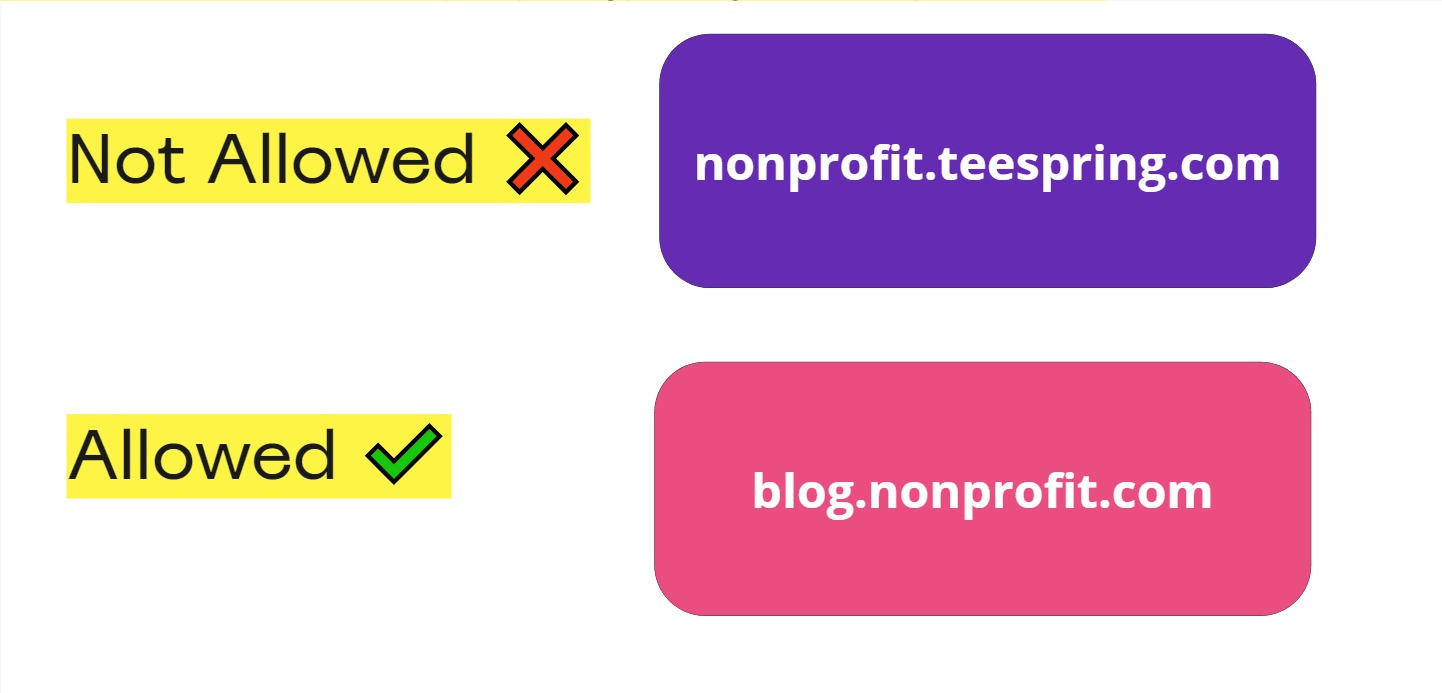
While this might seem obvious, I’ve spoken with several nonprofits that want to send traffic to things like an event page that’s hosted on Eventbrite or a landing page hosted by Constant Contact. Unless these are subdomains of your owned domain, you won’t be able to send traffic directly to those pages.
Instead, you’ll need to send them to a related page on your domain and direct them from there.
Does Your Website Have An SSL Certification?
When it comes to security, Google is expecting you to have an SSL certificate and serve your website via HTTPS. This is a web standard at this point and any host will be able to provide and help you set this up.
If you’re not sure what this means or how to check, you can use GoDaddy’s free SSL checker here and check your nonprofit’s website in just a few seconds.
Does Your Website Load Quickly?
When it comes to “loading quickly” things are a bit more ambiguous but if your page is loading in under two seconds you shouldn’t have any issues. You can use Google’s Page Speed Insights tool to check your page speed.
If your website is above 50 out of 100, you should have no issue with getting approval. If you’re below, you may need to make improvements before getting approved.
Does Your Website Have Technical Issues?
Google wants to make sure your website doesn’t have broken links, a poor mobile experience, or unclear navigation. These easy to spot issues can easily lead to your application being denied.
Spend 60 seconds clicking around your website and make sure you don’t have 404 errors or clicks that don’t function.
Is It Easy To Understand Your Mission?
Pretend you’re a typical user on your website, is it easy to navigate and understand your nonprofit’s mission? If a random Google employee can’t quickly understand your nonprofit’s mission then you’ll need to make some changes.
Does Your Website Have Unique Content?
Make sure your website has original material that relates directly to your nonprofit’s mission. While it might be tempting to republish content from other sources, Google wants to see that you’re creating unique value.
Does Your Website Include Your Registration Number?
In the US this is your EIN but whatever it’s called you’ll want to make sure it’s clearly noted in the footer, homepage and about page of your website. Typically adding this to the footer is enough to get the job done since it will cover the entire site.
Is Your Website Overly Commercial?
Your website and your nonprofit should not be overly commercial. This means you don’t have affiliate links, display advertising and your organization offers something to the general public beyond only paid services. Those services could be as simple as public information or as complex as free care but you need to be offering something outside of paid services.
These rules are intended to keep for-profit businesses from presenting themselves as nonprofits and as long as your organization is a true nonprofit I rarely see this become an issue.
Step 2: Sign Up For Google For Nonprofits
Once you’ve confirmed that your nonprofit is eligible, it’s time to start applying! This video explains the process in less than 3 minutes:
The first thing you’ll do is sign up for Google for Nonprofits which will then get you access to apply for the Google Ad Grant.
To start this process, go to Google For Nonprofits and click the “Get Started” button in the top right corner.
You’ll be taken through a series of prompts where you’ll verify your nonprofit’s status, confirm your eligibility based on the criteria we just reviewed, and then submit your information to be verified by Goodstack (which is a 3rd party that Google uses to verify nonprofits). It typically takes less than 5 days to get approved but if you run into issues you can contact Goodstack directly here.
If you do get rejected, make sure to contact Goodstack (and not Google) to verify your status. Incorrect rejections can happen, especially if your nonprofit is very new, and while they’re uncommon you should still follow up.
Once you’re verified, you’ll receive a confirmation email and you’ll be able to move on to the next step.
Step 3: Apply For A Google Ad Grant
Now it’s time to login to your Google For Nonprofits account and apply for the Google Ad Grant program. Click the “Get Started” button in the Google Ad Grants section and you’ll be taken through a series of prompts.
Once you’ve completed the steps (which should take around 10 minutes), Google will check your website to make sure everything is compliant. This process typically takes 3 days and you should look for an email once you’re approved.
Do not create a Google Ads account prior to getting accepted!
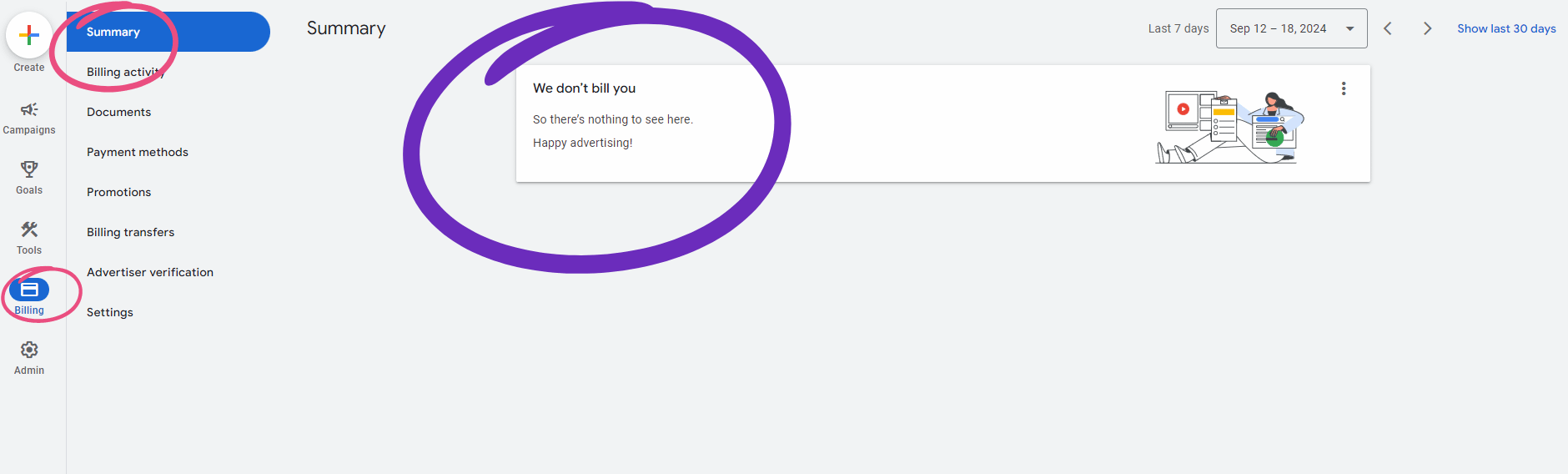
Instead, once your nonprofit is approved, Google will allow you to log into a ready-made Google Ad Grant account. If you aren’t sure if you’re in a paid or grant account, navigate to the billing summary page using the left sidebar where you should see something that reads “We don’t bill you So there’s nothing to see here. Happy advertising!”
That’s it! You now have a Google Ad Grant!
What To Do If You Get Stuck
Applying for the Google Ad Grant isn’t always straightforward and some nonprofits will run into account access issues or cryptic rejection messages from Google.
If you get stuck, you can always contact Google For Nonprofits. However, the support you get can be spotty.
If you’re a nonprofit struggling with this process, you’re welcome to book a free call and we can help you navigate the process. Just find a time here. There’s no obligation or expectation and we’d be happy to help you get the Google Ad Grant!
But getting approved is just the beginning of your Google Ad Grant journey. Once you’ve secured that $10,000 monthly budget, you’ll face a whole new set of challenges…
Now What?
Now it’s time to start using and eventually maximizing your Google Ad Grant! We’ve helped dozens of nonprofits turn their $10,000 monthly grant into real results, and we’re ready to share our strategies with you.
While getting approved is an achievement, many nonprofits find themselves overwhelmed by Google’s requirements once they have the grant. Between creating effective campaigns, following grant compliance rules, and constantly adapting to Google’s changing policies, it’s no wonder that the average nonprofit uses just $300 of their available $10,000 monthly budget.
If you want to have someone else handle it, you can always work with Digital Tabby to manage your Google Ad Grant! But if you’d prefer to handle things internally, check out our Google Ad Grant course and program where you’ll join a community of nonprofits mastering their grants together with expert guidance.
Not sure which option is right for you? You can always book a call here and our Google Ad Grant pros will get you pointed in the right direction!